
A simple question with a story behind it — one engineer, one disastrous midnight sale, and everything that cheatsheet is really trying to tell you.
The short answer: load balancing is the practice of spreading incoming traffic across several servers so that no single one ever gets buried. One doorway in front, many workers behind, and something smart in the middle deciding who handles what.
That’s the whole idea in a sentence. But a sentence doesn’t tell you why it matters, how the traffic gets divided, or what actually breaks the night you don’t have it. So I put the full picture on one page — save this, it’s the entire topic at a glance:
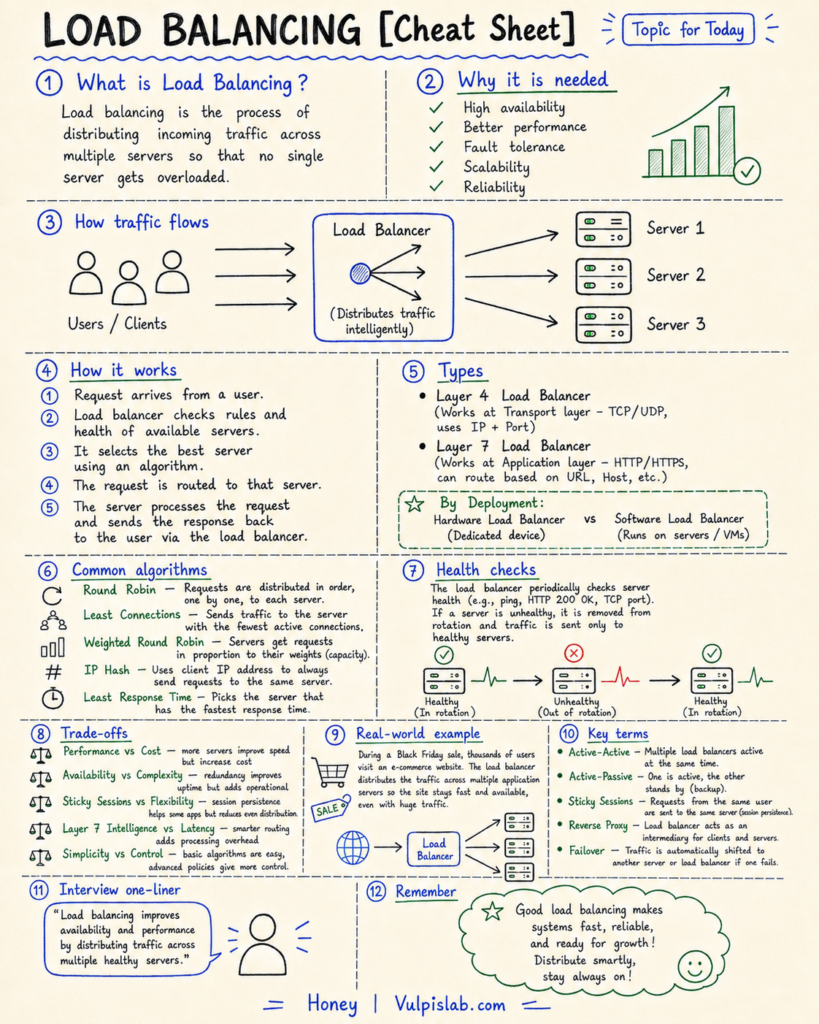
A cheatsheet is a great map. The trouble with maps is they don’t stick in your memory. Stories do. So here’s the story that makes every single box up there click into place.
PROBLEM
Scenario — When One Server Carries Everything
Maya had two minutes before the sale went live, and the only thing she felt was calm.
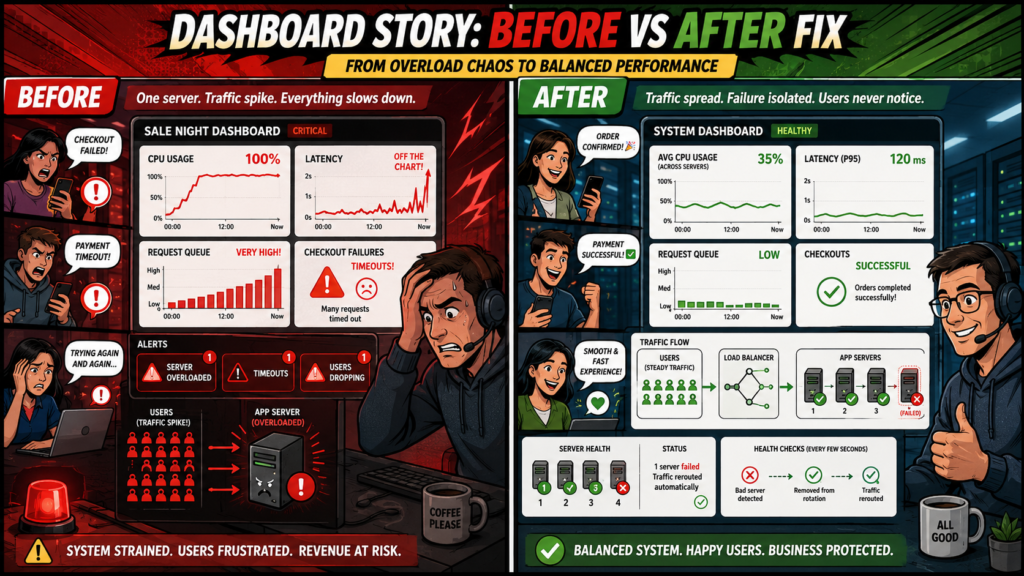
The dashboard was green. One server — a single, reliable box that had carried the store for a year without complaint — sat at a comfortable nine percent CPU. Midnight hit. The banner flipped to 50% OFF. And the link marketing had quietly seeded everywhere did exactly what links do when something is free enough.
Traffic didn’t climb. It detonated.
By 12:01 the CPU graph was a wall. By 12:02 the latency line — normally a flat little heartbeat near the bottom of the screen — had launched clean off the top of the chart. Requests were arriving faster than the server could answer them, so they queued. Then the queue grew so long that new requests timed out before the old ones even finished. Maya watched a single checkout request sit, and spin, and die.
She tried to give the box more muscle. But you can’t resize a server that’s actively on fire — rebooting mid-sale drops every request in flight and hands every shopper an error at once. And even if she could, the ugly truth underneath stayed true: a bigger box is still one box. It just has a higher ceiling to slam into. The crowd would find that ceiling too.
The store wasn’t broken — the code was fine, the database was fine — the server was simply outnumbered. One cashier. An entire stadium pushing toward the register. The flood eased around 12:25, not because she fixed anything, but because the first wave gave up and went to bed.
The machine wasn’t weak. It was alone.
Task — What Actually Had to Be Fixed
By morning the post-mortem had narrowed to a single objective, and Maya wrote it at the top of the whiteboard: no single server can ever be a single point of failure again.
Unpacked, that meant four concrete requirements. The system had to stay available even when one machine died. It had to hold its performance under a sudden spike. It needed fault tolerance, so a failure became a non-event instead of an outage. And it had to scale — absorb ten times the traffic by adding capacity, not by praying one box held.
That’s the task. The rest of the story is how she met it.
PURSUIT
Action — Designing the Fix
Dev found her at the whiteboard and read the objective. “So you want to make the server stronger.”
“I want to make sure last night never happens again.”
“Those aren’t the same thing. A stronger server is just a more expensive version of last night. The fix isn’t one hero — it’s a crowd of ordinary servers sharing the work, and something smart deciding who gets what.”
The load balancer. He drew a box at the front of the diagram. Shoppers would no longer hit the servers directly — they’d hit this. It takes each incoming request and routes it to whichever server in the pool is in the best shape to handle it. To the shopper, nothing changes: one address, one response. Behind the curtain, the work fans out so no single machine ever faces the stadium alone. Technically, the balancer is a reverse proxy — it speaks to the public on your servers’ behalf, and the servers never deal with the crowd directly.
Layer 4 vs Layer 7. “So how does it pick?” Maya asked. Dev said it started with how deeply the balancer even looks. A Layer 4 balancer works at the transport layer — it shuffles connections by IP and port without reading the request, which is fast and cheap because it isn’t thinking hard. A Layer 7 balancer works at the application layer, where it can see the URL, host, and headers, and route on meaning — heavy /checkout calls one way, static images another. That intelligence costs a sliver of latency but buys real control. They chose Layer 7. “And you pay the latency tax on purpose,” Dev said. “Every decision here is a trade you make on purpose.”
Hardware vs software. Maya asked about the rack-mounted appliance her old company ran. “That’s a hardware load balancer — blistering, and priced like a car.” Their answer was a software load balancer: the same logic running on ordinary VMs. Slower per packet, but cheap, flexible, and easy to scale up on a Tuesday afternoon. Hardware was a fortress; software was a tent you could pitch anywhere. As a startup, they needed the tent.
The algorithm.
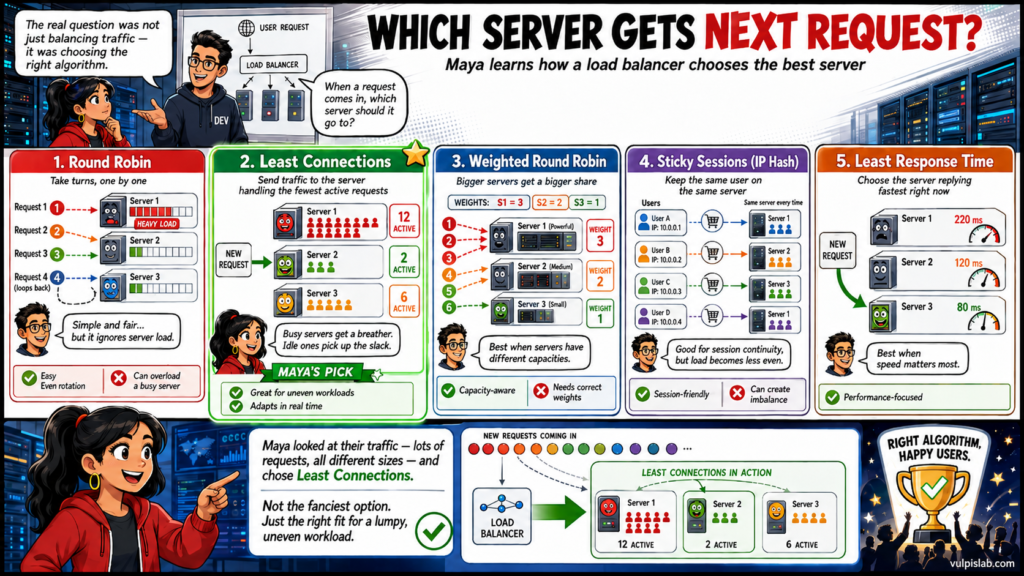
Then the real question: when a request comes in, which server should it go to? Dev walked her through the options one at a time.
The simplest is round robin — just take turns. First request to server one, second to server two, third to server three, then back to the start. Fair, even, easy to reason about. But Dev poked a hole in it: “What if server one is still chewing through a slow, heavy request when its turn comes around again? Round robin doesn’t notice — it just piles another one on while server two sits idle.”
So a smarter option is least connections. Instead of blindly taking turns, the balancer looks at how many requests each server is handling right now and sends the next one to whoever has the fewest. Busy servers get a breather; idle ones pick up the slack.
But what if the servers aren’t equal — one’s a big powerful machine, another’s small? That’s what weighted round robin is for. You give each server a “weight” based on its capacity, and the stronger ones simply get a bigger share of the traffic.
Sometimes a user needs to stay on one specific server — say their shopping-cart session is stored there. Sticky sessions handle that by always sending the same user back to the same server (usually by hashing their IP address, which is why it’s also called IP hash). It’s convenient, but it comes at a price: pinning users in place makes the overall load less even.
And if all you care about is speed, least response time sends each request to whichever server is replying fastest at that moment.
Maya looked at their traffic — lots of requests, all wildly different sizes — and picked least connections. Not the fanciest option on the board, just the right fit for their lumpy, uneven workload.
Health checks. Then she went quiet, because she’d spotted what actually killed her the night before. None of these algorithms matter if the balancer doesn’t know which servers are alive. So it constantly checks: every few seconds it probes each server — a ping, a TCP connection, an HTTP request expecting a clean 200 OK. The instant a server stops answering correctly, it’s pulled from rotation and traffic flows only to the healthy ones; when it recovers, it slips back in. “Last night,” Maya said, “my one server was drowning and nobody was watching the water.” That was the missing piece.
The trade-offs. Before he left, Dev scrawled a warning in the corner: none of this is free. More servers mean more throughput and more cost. Redundancy buys uptime and complexity. Sticky sessions help session-bound apps but unbalance load. Smart Layer 7 routing adds intelligence and latency. “None of these has a free side,” he said. “Just pick your poison out loud.”
PROPOSAL
Result — The Night It Held
Three weeks later, another sale. Same banner, same seeded link, the same detonation at 12:00 sharp.
This time the flood hit the balancer first, and it spread the wave across a fleet of servers — none of them ever facing more than its share. Because Maya no longer trusted a single anything, even the balancer had a twin: two running side by side, both live, both taking traffic. That’s active-active — she’d rejected the cheaper active-passive setup, one live and one cold on standby, because “standby” was a word she didn’t want to bet the busiest night of the year on.
At 12:14, an application server genuinely fell over — a real hardware fault that would have been a catastrophe a month earlier.
Nothing happened.
A health check missed, the balancer pulled the dead server before most requests even noticed, and traffic shifted to the survivors. Failover, working exactly as designed. The fleet absorbed the gap, and the graph stayed flat and green and gloriously boring while shoppers who’d never know any of this clicked Buy and got confirmation pages in under a second. She finished her coffee this time.
The Takeaway
Strip the story back down and you’re left with the sentence we started with: spreading traffic across many servers so no single one gets buried. But now every word carries weight. The load balancer is the reverse proxy out front. The algorithm is how it chooses. Layer 4 / Layer 7 is how deeply it looks. Health checks tell the living from the dying. And failover, active-active, sticky sessions are the habits that kept the second midnight boring.
That’s the real lesson in the cheatsheet: resilience never comes from making one machine invincible. It comes from a system that shares the weight, watches its own pulse, and routes around its own wounds before anyone outside ever feels them.
Load balancing improves availability and performance by distributing traffic across multiple healthy servers.
One server can always fail. A well-balanced fleet just keeps serving.