
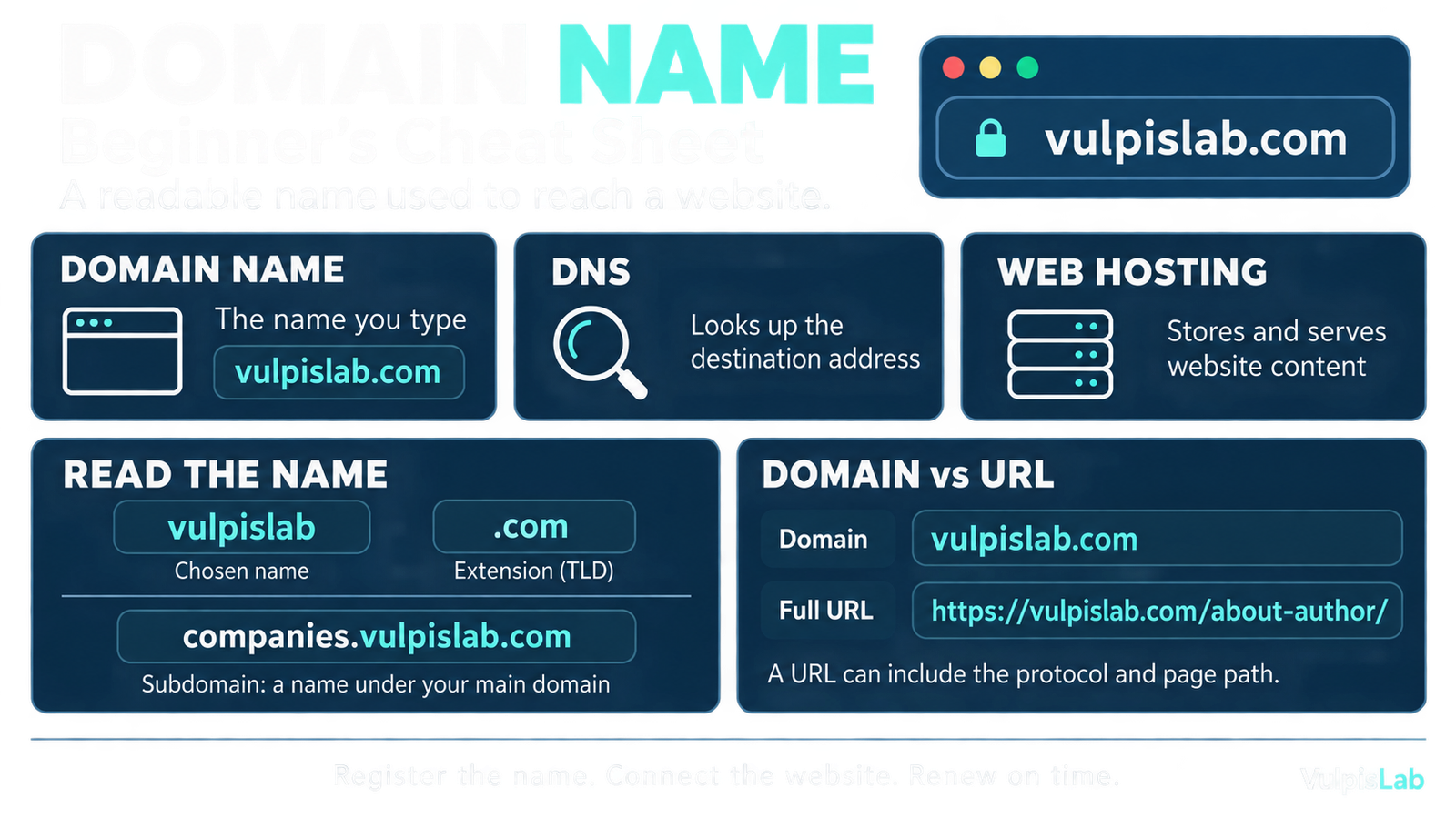
A domain name is the readable name people use to reach a website, such as vulpislab.com. It helps visitors find a website without remembering an IP address (the address computers use to communicate over a network). Cloudflare explains domain names.
Imagine you have created a website. Your homepage is ready, your articles are published, and you want to share it with a friend. You give them a name they can type into their browser.
For VulpisLab, that name is vulpislab.com. However, the name is one part of the setup. The website also needs somewhere to run and a way for the browser to find it.
Why do we need domain names?
Domain names make websites easier to remember and share. People can recognise a meaningful name more easily than a sequence of numbers.
Think about how you call a friend. You usually select their name from your contacts instead of typing their phone number every time. The name is convenient for you, while the number helps the phone make the connection.
A domain name serves a similar purpose. You remember the website’s name, while the browser uses DNS to find an associated IP address. The name can also remain the same when the website’s underlying address changes. MDN explains why domain names exist.
What is the difference between a domain name, hosting, and DNS?
A domain name identifies the website, hosting provides the resources to run it, and DNS helps the browser find its address. These services work together when someone visits a website.
| Component | What it does | Simple example |
|---|---|---|
| Domain name | Gives visitors a readable name to use. | vulpislab.com |
| Web hosting | Stores and serves the website’s content and runs its software where needed. | The service hosting your pages and images. |
| DNS | Provides information that helps locate the destination associated with the name. | Looking up an IP address for vulpislab.com. |
A web server (a computer and software that respond to web requests) sends content to the browser. Your hosting service provides the resources needed for this. MDN explains web servers.
DNS, short for Domain Name System, handles the name lookup. It helps the browser discover where to connect. Cloudflare explains DNS.
How does a domain name work?
When someone enters a domain name, their browser uses DNS information to find a destination address. It then connects to that destination and requests the website.
Consider a simplified example in which VulpisLab runs on a server with the address 192.0.2.44. This is an illustrative address, not a statement about VulpisLab’s actual hosting.
1. The visitor enters the domain name
The visitor types vulpislab.com into their browser. The browser needs an address associated with that name before it can request the page.
2. DNS helps find the address
The browser or operating system may already have a usable answer in its cache (temporarily saved information). Otherwise, a DNS resolver (a service that looks up DNS information) helps find the answer.
In this simplified example, the lookup returns 192.0.2.44.
3. The browser requests the page
The browser connects to the destination and requests the page. The server responds with content that the browser uses to display the website.
DNS supplies the lookup information; the browser makes the web connection. See Cloudflare’s explanation of DNS lookups.
What are the parts of a domain name?
A domain name contains parts separated by dots. In vulpislab.com, vulpislab is the chosen name, and .com is the ending.
The ending is called a top-level domain, or TLD. Other examples include .org and .net. In this particular example, vulpislab is called the second-level domain because it sits directly before .com.
The ending belongs to the complete name. Therefore, example.com and example.org are different domains, even though they contain the same word. Cloudflare explains domain name components.
Is a domain name the same as a URL?
A domain name is one part of a URL. A URL (the full address used to request a page or resource) can also include how to connect and which page to open.
Consider the address of the VulpisLab author page:
| Part | Meaning |
|---|---|
https:// | Tells the browser to use HTTPS, which protects data during transfer. |
vulpislab.com | The domain name. |
/about-author/ | The path identifying the requested page. |
Your homepage and individual articles can share the same domain name while having different paths. This lets visitors open a specific article instead of always starting at the homepage. MDN explains URL structure.
What is a subdomain?
A subdomain is a name created under another domain. It can provide a separate address for a particular section, application, or service.
For example, imagine VulpisLab introduces a company research website for people preparing for interviews. It could use companies.vulpislab.com as its address.
Here, companies.vulpislab.com would be a subdomain of vulpislab.com. It could display different content from the main website. Creating the name is only part of the setup; the application and its domain settings must also be configured. MDN explains subdomains.
How do you register a domain name?
You register an available domain through a domain registrar (a company that handles domain registrations), or a reseller working with one.
First, search for the name you want. If it is available, review the registration terms and complete the registration. You can then follow your hosting provider’s instructions to connect the domain to your website. ICANN explains domain registration.
Registration lasts for a defined period. To keep using the domain, you must renew it. Review the renewal price as well as the initial price, and keep track of the expiry date. ICANN explains domain renewal.
Which DNS services do AWS, Azure, and Google Cloud offer?
AWS provides Amazon Route 53, Microsoft Azure provides Azure DNS, and Google Cloud provides Cloud DNS. These services let you manage DNS records (entries that help browsers find the destination associated with a domain name).
| Cloud provider | DNS service |
|---|---|
| Amazon Web Services — AWS | Amazon Route 53 |
| Microsoft Azure | Azure DNS |
| Google Cloud — GCP | Cloud DNS |
For example, you could manage the DNS records for vulpislab.com using any of these services. DNS helps the browser find the destination address, and the browser then connects to request the website. A hosting service stores and serves the website’s content.
Their shared purpose here is DNS hosting; their additional features differ.
For an AWS example, read Amazon Route 53 Explained: How a Domain Connects to a Server.
Frequently asked questions
Does registering a domain automatically create a website?
No. Registration reserves the name for your use. You still need website content and hosting, although a provider may offer these services together. ICANN’s registration guidance.
Can you register a domain before building the website?
Yes. You can register an available name first and connect it to a website later. ICANN’s registration guidance.
Do you own a domain forever after paying once?
Standard registration gives you the right to use a domain for a defined period. You need to renew that registration to continue using it. ICANN’s renewal guidance.