
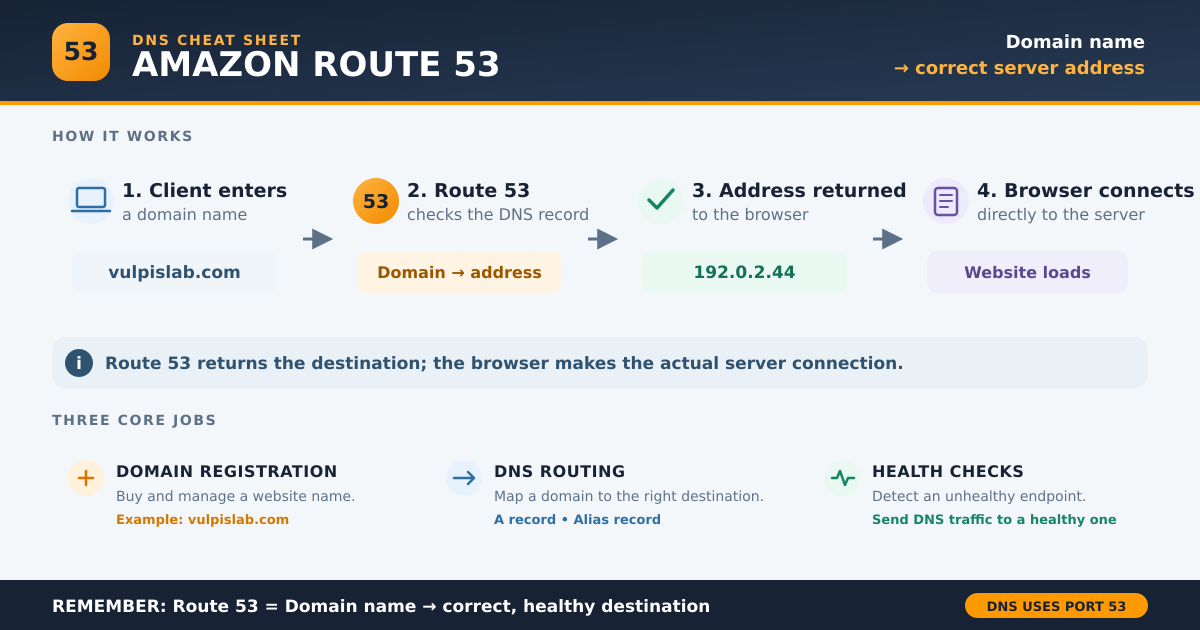
Amazon Route 53 is a DNS service provided by AWS. In simple terms, it helps a client’s browser find the server behind a domain name.
For example, when someone enters vulpislab.com, Route 53 finds the correct server address. The browser then connects to that server and opens the website.
Why Do We Need Amazon Route 53?
A website runs on a server. Every server has a technical address called an IP address, such as:
192.0.2.44
People cannot easily remember IP addresses. They prefer simple names such as:
vulpislab.com
Therefore, we need a system that connects the easy-to-remember domain name with the server’s technical address. This system is called DNS, or Domain Name System.
Amazon Route 53 is AWS’s managed DNS service.
Think of it like a contact list:
| Website component | Simple meaning |
|---|---|
vulpislab.com | Contact name |
| Server IP address | Phone number |
| Route 53 | Contact list that matches the name with the number |
AWS explains that DNS connects human-readable domain names with the IP addresses computers use. Read the official AWS explanation.
Scenario: Connecting Vulpislab.com to a Server
Suppose the Vulpislab website is running on an Amazon EC2 server.
The setup contains:
- Domain name:
vulpislab.com - Web server: Amazon EC2
- Example server IP:
192.0.2.44 - DNS service: Amazon Route 53
Inside Route 53, we create a DNS record:
vulpislab.com → 192.0.2.44
This record tells Route 53 where the Vulpislab website is running.
What Happens When a User Opens the Website?
When a user enters vulpislab.com in a browser:
- The browser asks the DNS system, “Where can I find
vulpislab.com?” - The DNS request eventually reaches the Route 53 name servers.
- Route 53 checks the DNS record for
vulpislab.com. - Route 53 returns the server address
192.0.2.44. - The browser connects directly to that server.
- The server sends the website page back to the browser.
The entire process normally happens within milliseconds.
According to the AWS traffic-routing documentation, Route 53 returns the destination address to the DNS resolver. The browser then uses that address to contact the web server.
Does Route 53 Actually Connect the Client to the Server?
In everyday language, we can say:
Route 53 connects a domain name to its server.
However, the technically accurate explanation is:
Route 53 tells the client where the server is. The client’s browser then makes the actual connection to the server.
Route 53 normally does not deliver the website’s images, pages, or application data. Its main job is to provide the correct destination.
The Three Main Functions of Amazon Route 53
According to the official Amazon Route 53 documentation, it performs three main functions.
1. Domain Registration
You can purchase and manage domain names such as example.com through Route 53.
However, purchasing a domain through Route 53 is optional. You can purchase it from another registrar and still use Route 53 for DNS.
2. DNS Routing
Route 53 connects a domain or subdomain with the appropriate destination.
For example:
vulpislab.com→ Website serverapi.vulpislab.com→ API serverblog.vulpislab.com→ Blog application
The destination can be an IP address, load balancer, CloudFront distribution, S3 website, or even infrastructure outside AWS.
3. Health Checking
Route 53 can check whether a server is working.
Suppose a website has two servers:
- Server A is the primary server.
- Server B is the backup server.
If Server A becomes unavailable, a properly configured health check and failover policy can direct new DNS requests towards Server B.
AWS explains that Route 53 can monitor endpoints using HTTP, HTTPS, or TCP and route traffic away from unhealthy resources. Learn about Route 53 health checks.
Three Route 53 Terms Beginners Should Know
Hosted Zone
A hosted zone is like a folder containing all DNS settings for one domain.
For example, the hosted zone for vulpislab.com may contain records for:
vulpislab.comwww.vulpislab.comapi.vulpislab.com
DNS Record
A DNS record is an instruction describing where a domain or subdomain should point.
Example:
vulpislab.com → 192.0.2.44
TTL
TTL means Time to Live. It controls how long a DNS resolver can store a DNS answer before requesting it again.
A shorter TTL helps users receive updated records sooner. A longer TTL reduces repeated DNS queries. Explore official Route 53 concepts.
Common DNS Records in Route 53
| Record | What it does | Simple example |
|---|---|---|
| A record | Connects a domain to an IPv4 address | vulpislab.com → 192.0.2.44 |
| CNAME record | Connects one name to another domain name | www.vulpislab.com → vulpislab.com |
| Alias record | Connects a domain to supported AWS resources | Domain → Load Balancer or CloudFront |
An Alias record is a special Route 53 feature. It is commonly used when the website runs behind services such as an AWS load balancer, CloudFront, or an S3 website endpoint.
Route 53 Is Not Website Hosting
Route 53 does not store website files or run application code.
These responsibilities belong to hosting services:
| Component | Responsibility |
|---|---|
| Domain name | Gives the website a memorable name |
| Route 53 | Finds the correct server or AWS resource |
| EC2, S3 or another host | Runs or stores the website |
| Database | Stores application data |
AWS confirms that Route 53 is a DNS service, not a website-hosting service. It can also route users to servers outside AWS. Read the Amazon Route 53 FAQs.
Why Is It Called Route 53?
The word Route represents directing a request towards the correct destination.
The number 53 refers to the network port traditionally used for DNS communication. The DNS standard specifies port 53 for both UDP and TCP communication. See RFC 1035.
When Should You Use Amazon Route 53?
Route 53 can be useful when you want to:
- Connect a custom domain to an AWS application.
- Create subdomains for a website, API, or admin portal.
- Direct users to a healthy or nearby server.
- Connect a domain to CloudFront, an AWS load balancer, EC2, or S3.
- Manage DNS records from the AWS environment.
You do not have to use Route 53 merely because your application runs on AWS. Another DNS provider can also manage the domain.
Frequently Asked Questions
What is Amazon Route 53 in one sentence?
Amazon Route 53 is an AWS DNS service that helps a browser find the server or resource connected to a domain name.
Does Route 53 host a website?
No. Route 53 manages domain registration, DNS records, routing decisions, and optional health checks. A hosting service runs the website.
Can Route 53 connect to a non-AWS server?
Yes. Route 53 can point a domain towards AWS resources or infrastructure hosted outside AWS.
Can I buy a domain from GoDaddy and use Route 53?
Yes. You can keep the domain with GoDaddy or another registrar and update its name-server settings to use Route 53 as the DNS service.
Is Amazon Route 53 free?
No. Route 53 uses pay-as-you-go pricing. Charges can include hosted zones, DNS queries, health checks, traffic policies, and domain registration. Current charges are listed on the official Route 53 pricing page.
Conclusion
Amazon Route 53 acts as the address guide between a domain name and its destination.
When a visitor enters vulpislab.com, Route 53 finds the configured server address and returns it. The browser then connects directly to that server and loads the website.
Easy memory line:
Amazon Route 53 = Domain name → correct server address.
[…] For an AWS example, read Amazon Route 53 Explained: How a Domain Connects to a Server. […]